Shipping protection integration
Integration guide — Shipping Protection
Section titled “Integration guide — Shipping Protection”1. Business flow
Section titled “1. Business flow”-
Get a quote
-
Two ways to obtain the rate and quote.
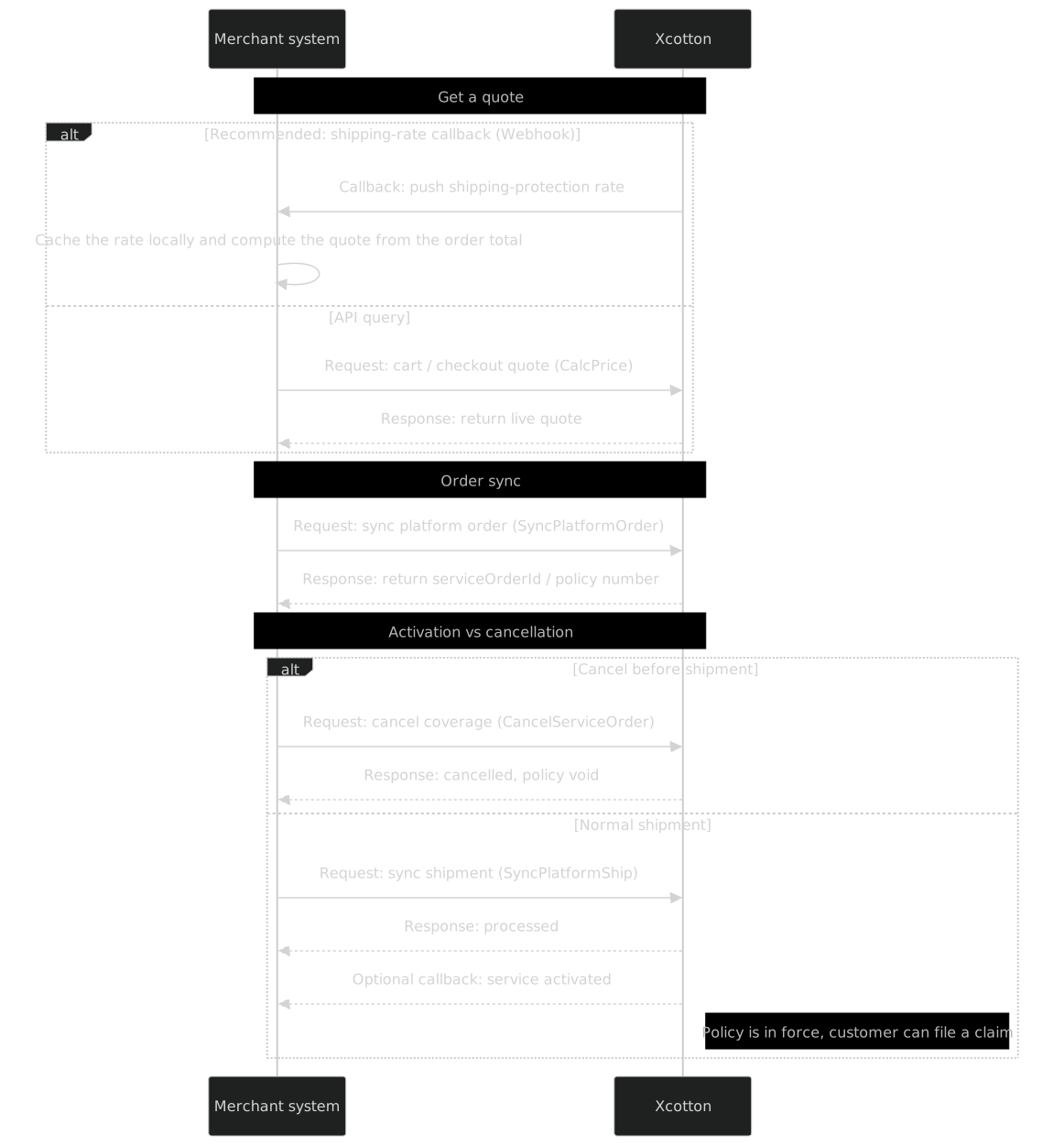
- Option 1 (strongly recommended): receive the shipping-rate callback. Compute the premium locally from the delivered rate and the actual order amount. No real-time outbound call is needed — best for page load and UX.
- Option 2: call the cart / checkout quote endpoint to fetch a live estimate.
-
-
Order sync
- After the customer purchases shipping protection, push the order details via sync platform order. Xcotton returns the policy number (service-order number). Note: the policy is not officially in force yet.
-
Shipment sync and activation
- After dispatch, call sync shipment to push the carrier details. Once processed, the shipping-protection policy becomes effective and claims are open. Xcotton can be configured with the service-activated callback to notify you asynchronously. At activation you may receive both the activated callback and the service-state callback (
serviceState=3); deduplicate by service-order number.
- After dispatch, call sync shipment to push the carrier details. Once processed, the shipping-protection policy becomes effective and claims are open. Xcotton can be configured with the service-activated callback to notify you asynchronously. At activation you may receive both the activated callback and the service-state callback (
-
Cancellation
- Shipping protection can be cancelled only before shipment is synchronized. Call CancelServiceOrder; a
serviceOrderIdcontainingSPis shipping protection. Cancellation is not supported after shipment; for exceptional cases contact the product and business teams.
- Shipping protection can be cancelled only before shipment is synchronized. Call CancelServiceOrder; a
2. Flow and sequence diagrams
Section titled “2. Flow and sequence diagrams”2.1 Shipping-protection business flow
Section titled “2.1 Shipping-protection business flow”
2.2 Shipping-protection interaction sequence
Section titled “2.2 Shipping-protection interaction sequence”